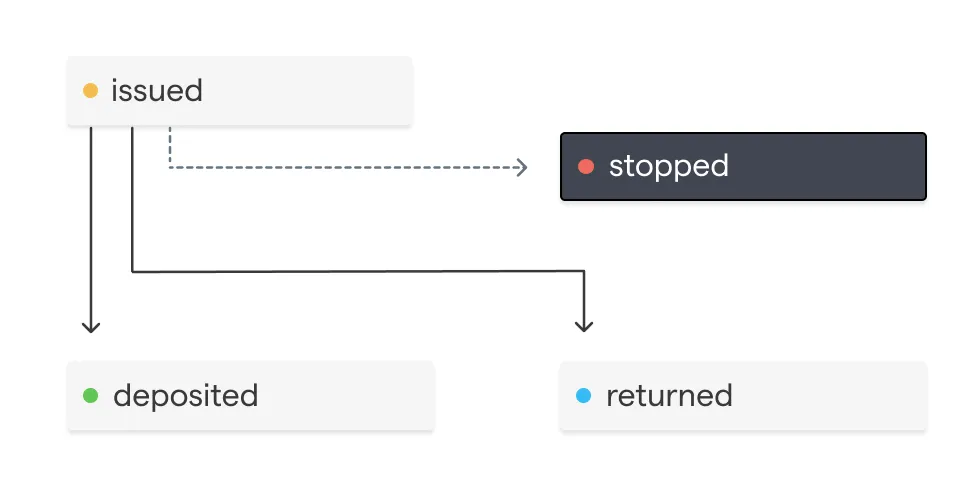

Disbursement Lifecycle
Disbursement Status Lifecycle
A Disbursement’s status represents a workflow lifecycle.
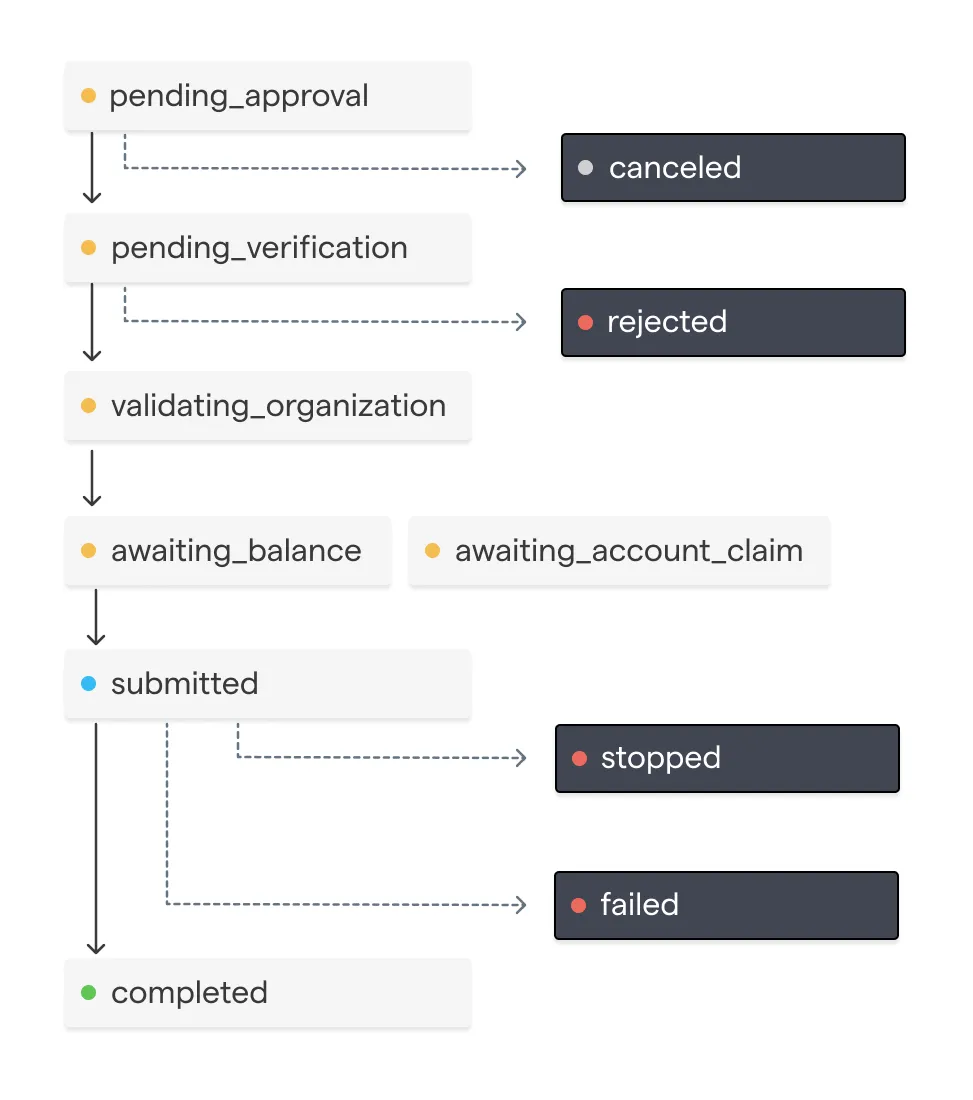
It tracks whether a Disbursement has been approved or canceled by your organization based on your organization’s configured approval rules. Additionally, it tracks if the Disbursement has been verified by the Chariot team.
Once a Disbursement’s status is submitted, a request will be made to the preferred payment rail to initiate the payment.
A Disbursement with a submitted status will have at least one item in the transfers array.
Once a Disbursement is submitted, it can no longer be canceled. Instead, depending on the payment rail the disbursement may be able to be stopped.
Just-In-Time (JIT) Disbursements
Just-In-Time disbursements enable grantmakers to create and send disbursements without needing to pre-fund their Chariot Deposit Account. When a disbursement with auto-funding enabled is approved, Chariot automatically creates an inbound transfer for the exact disbursement amount by immediately initiating an ACH debit.
JIT disbursements is an optional feature that must be enabled on a per-account basis. Contact Chariot to enable this feature for your account.
How JIT Disbursements Work
- Create Disbursement: Create a disbursement with
auto_fundset totrue - Approval & Auto-Funding: When the disbursement is approved (either manually or via auto-approval), Chariot automatically creates an inbound transfer for the disbursement amount
- Execution: By default, the disbursement is not tied to the specific auto-funded transfer. Instead, it executes like any other disbursement when the required funds are available in your account. To reserve the auto-funded transfer for the disbursement, use a funding earmark
This eliminates the need to manually manage the funding of your account for each disbursement.
Funding Earmarks
Your account’s balance is one shared pool. A JIT disbursement’s funding lands in that pool, and Chariot sends disbursements as funds become available, so a smaller or newer disbursement can spend the funds before the larger disbursement they were raised for. That disbursement then waits in awaiting_balance until your account has enough funds again.
A funding earmark prevents this. Set earmark_funding to true alongside auto_fund when you create a disbursement and Chariot holds the disbursement’s auto-funded transfer for that disbursement only.
How Funding Earmarks Work
- Hold placed: When Chariot initiates the ACH debit for the disbursement, it places a hold on those funds.
- Hold takes effect: When the ACH debit settles, the held funds are excluded from your available balance. Other disbursements and withdrawals can’t spend them.
- Hold released: When the disbursement’s first transfer is created, the held funds pay for it and the hold is released in the same step.
An earmark never delays a disbursement. If your available balance can cover the disbursement before its ACH debit settles, the disbursement is sent from your available balance without waiting. Its hold is then released, so the debit’s funds go to your available balance when they settle.
Held funds can’t be withdrawn. To return earmarked funds to your available balance, cancel the disbursement.
Payment Rail Lifecycle
Once a Disbursement is submitted, a payment is initiated through a specific payment rail. Each payment rail follows its own distinct payment lifecycle.
In-Network Payments
Payments sent from one Chariot Deposit Account to another Chariot Deposit Account can be made 24 hours a day, 7 days a week and, once approved, will settle instantly.
ACH
ACH transfer represents a credit (push) payment using the Automated Clearing House (ACH) network. This transfer method is used if the receiving organization is not available for In-Network Account Transfers. Funds availability is typically 1-2 days.
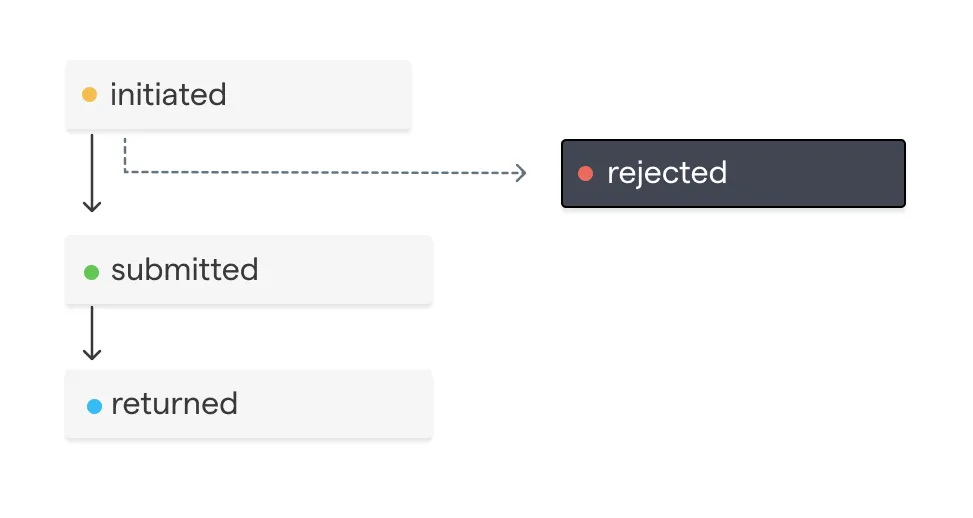
Mailed Check
A check transfer represents a physical check that is mailed to the receiving organization. This is the transfer method used when the receiving organization does not have a Chariot account.