

Transaction Management
Reconciliation & Grant Identifiers
Organizations will receive DAFpay gifts directly from each DAF provider — either via electronic transfer or mailed check.
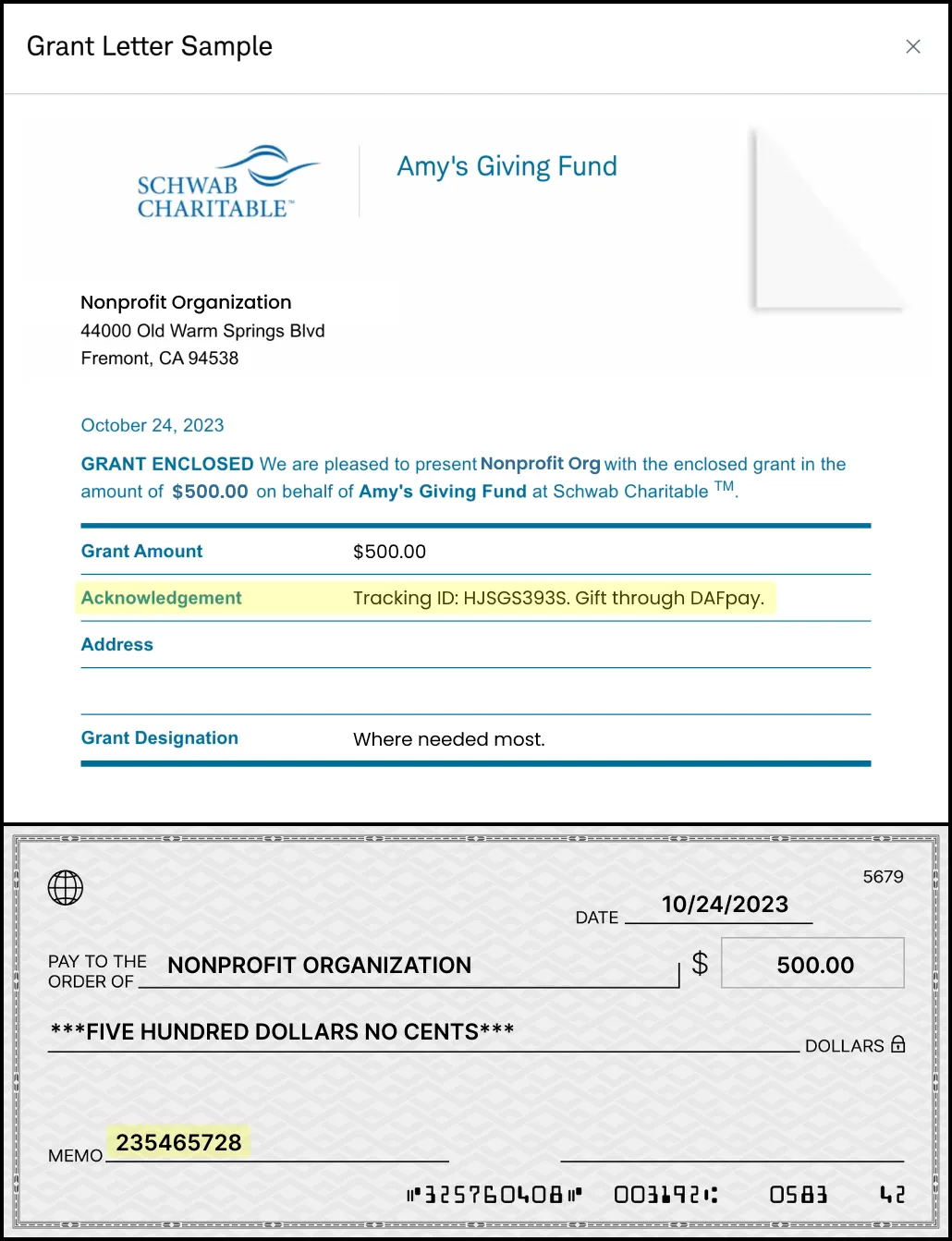
Because DAFpay does not handle the funds directly, when grants are sent from the DAF provider to the nonprofit, they will include a tracking ID and external ID as well as a “Gift via DAFpay” callout in the memo section, which can be used to easily identify and match the grant to the corresponding record in your platform’s transactions table.
Make sure that your platform displays the trackingId and externalId fields as searchable fields on your transactions dashboard.
DAFpay provides unique identifiers to help nonprofits reconcile donations once they arrive:
- Tracking ID: A 10-digit alphanumeric identifier generated by DAFpay, included in the initial grant request, and usually passed to the nonprofit from the DAF. This appears in the DAF provider’s data as a “Tracking ID:” string within the grant note or purpose.
- External Grant ID: A string identifier generated by the DAF provider following a successful grant initiation request. The format depends on the DAF provider and typically appears in the provider’s data as a “Grant ID.”

If you would like to include the name of the DAF provider on each grant in your dashboard (i.e., Fidelity Charitable),
you can use the fundId from the Grant object to call the Get DAF API.
Some DAF providers do not send DAFpay Tracking IDs. If the Tracking ID and DAFpay note are not available, first check for an External Grant ID. If you cannot find one, use the donor’s fund name, gift amount, and other grant details to match the inbound gift to the correct DAFpay donation line item.
Grant Statuses
A grant has one of three statuses: Initiated, Completed, or Canceled.
Initiated means the grant was successfully submitted and the DAF provider is still processing the gift. Every DAFpay grant from an integrated provider starts here.
Completed means the nonprofit has the funds. This is the status to treat as a successful grant. It covers both the case where Chariot matches the incoming payment to the grant and the case where the nonprofit confirms the funds arrived outside Chariot, identifying the grant line item by its trackingId or externalGrantId.
Canceled means the grant was canceled by the donor, or the DAF provider did not approve it.
Subscribe to the grant.updated Webhook Event to find out when a grant’s status changes. The event body carries identifiers only, not the new status, so call Get Grant and read the status field to get the current value.
Cancellations & Refunds
Donors may have the option to cancel their grants from their Donor Advised Fund portal before disbursement, subject to the specific policies of their DAF provider. As funds in DAFs are no longer under the donor’s direct ownership, the concept of refunds after the money leaves the DAF, does not apply.
Donations made via DAFpay are typically final and irrevocable gifts (depending on the specific policies of the DAF provider).
Cancelled grants will be marked as Cancelled in your platform’s dashboard and will not incur any processing fees.
If you believe a grant should be cancelled, please contact the donor first to confirm the cancellation and then send a request to the Chariot support team.