

Managing Gifts
Flow of Funds
Where DAFpay Funds Arrive
DAFpay submits the request but does not hold the donor’s DAF funds. Funds are sent the way that provider normally pays. Timing varies by route and provider, from a few days to several weeks.
Gifts reach the nonprofit one of two ways:
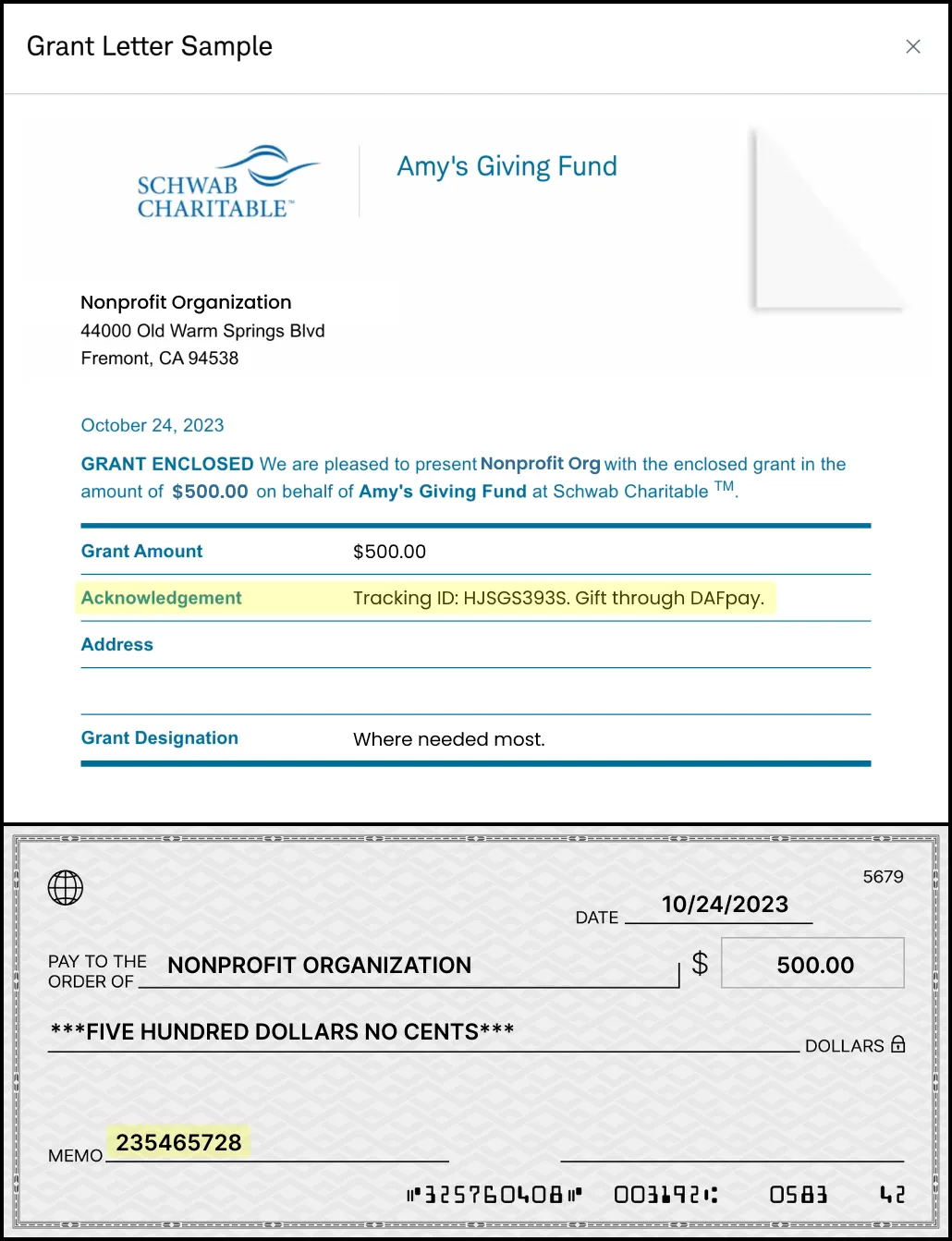
On a gift the provider pays you outside of Chariot, their own remittance carries the DAFpay identifiers. These examples show where the Tracking ID appears in the memo, usually as “Tracking ID {id} - Gift through DAFpay”. Wording varies by provider.

Displaying DAFpay Gifts
This section is for platforms offering DAFpay across many nonprofits’ forms. If you are a nonprofit integrating your own donation form, read Processing Donations below instead.
The trackingId and externalGrantId allow a nonprofit to reconcile the funds to the initiated DAFpay grant when the funds arrive. Display both IDs prominently and searchable in your dashboard.
What to Show
Some DAF providers do not pass the Tracking ID through on their remittances, which is why the External Grant ID matters as a second route. When neither appears, the nonprofit falls back to the fund name, amount, date, and designation.
Keep the Records Current
Subscribe to grant.created and grant.updated. When an event arrives, retrieve the current Grant and update the existing transaction using the stored Grant ID. If you support unintegrated providers, subscribe to unintegrated_grant.created and unintegrated_grant.updated and read those through their own endpoints.
Display the status Chariot returns. Grant creation means the request was submitted to the provider. When the Grant moves to Completed, either automatically when the funds are recorded or when the nonprofit marks it received, update your transaction from the Grant update.
Recording DAFpay Gifts
The funds in a DAF legally belong to the provider, so most nonprofits hard credit the DAF and soft credit the donor.
A DAFpay gift is initiated, not received. Record it in a pending state rather than as paid, and update it on grant.updated once the grant is received.
Expect nonprofits to ask whether DAFpay gifts sync automatically, and to want to review these records before they do.
Cancellations and Refunds
A donor may be able to cancel a pending grant through their DAF provider before disbursement, subject to that provider’s rules. Some providers report the cancellation or refund back to Chariot, and the Grant moves to Canceled on its own, so handle that status change the same way you handle any other. Chariot requires this reporting of new DAFpay integrations, so the set of providers that do it keeps growing. Where a provider does not report it, the Grant stays where it is until the donor or the nonprofit tells Chariot and Chariot marks it canceled. Your platform cannot cancel a Grant through the API.
Processing Donations
Donations represent gifts in Chariot and are only available to Chariot Deposit Account holders. If you are a platform offering DAFpay across many nonprofits’ forms, read Displaying DAFpay Gifts above instead.
Donations can be created from DAFpay gifts created via Create Grant, or other gifts that land in an organization’s account from a Chariot disbursement partner or a connected payment source. Building your gift processing around Donations allows you to use the same workflow for DAFpay gifts and gifts from your other connected payment sources.
Every Grant has a Donation, but not every Donation has a Grant.
Find the Donation
The donation record is created after the Grant. Once the Donation exists, its ID is added to the corresponding grant. This happens asynchronously, so donationId may not be present if you retrieve the Grant immediately.
Once the Donation exists, it behaves like any other gift in Chariot. Donation Status covers payment_status, settlement timestamps, retrieving donations, and writing your own status back.
Match Payments Outside Chariot
Donations received in your Chariot Deposit Account are automatically tied to the DAFpay initiation. For donations received outside of Chariot, you can use the DAFpay tracking ID to search for the donation and update the status to Received outside Chariot.
Some DAF providers do not pass the Tracking ID through on their remittances, which is why the External Grant ID matters as a second route. When neither appears, match on the donor’s fund name, amount, date, and designation, and review an uncertain match before marking the Donation received. Some providers batch several gifts into one payment, so one payment can match more than one Donation.
Chariot is a financial technology company, not a bank. Chariot Accounts come with a Demand Deposit Account through our banking services partner, Column N.A., Member FDIC. Deposits in Chariot Accounts are eligible for FDIC insurance up to $250,000 per depositor, for each insurable capacity in which the account is held.